How to respond to a new lead fast, even when you're out on a job
Leads go to whoever answers first. Here is how to respond to a new lead in minutes, with an alert, an automatic first reply and one person who owns it.

It's 7 p.m. A homeowner fills out the form on your website, then goes back to searching for the next name on the list. You are still on a job, and the message sits unread until morning. The short answer to how you respond to a new lead is: set up your tools so you are told within seconds, the customer gets a first reply within minutes, and one person owns the follow-up. You can do all three for free.
How fast should I respond to a new lead?
As fast as you can, and the cost of waiting is easy to miss.
A person who fills out a form is comparing. They sent the same kind of message to a few businesses, and the first one that answers usually gets the conversation. Waiting until you are back at your desk means you compete against someone who replied from their truck.
The best-known study on this is "The Short Life of Online Sales Leads," published in 2011 by researchers from Sungkyunkwan University, the University of Toronto and InsideSales.com. Its finding, according to the Harvard Business Review, is that most companies do not respond nearly fast enough to online inquiries. The full data sits behind a paywall, so we are not quoting its numbers here. The direction matches what most owners already sense, and it is more than a decade old, so treat it as a reason to check your own habits, not as a precise benchmark.
Say you run a small plumbing company. Each missed evening form is a customer who called the next plumber. You never see that loss, because nobody tells you they chose someone else.
Why leads wait: nobody is watching the inbox
Most slow replies are not laziness. The form sends an email to a shared inbox, and that inbox gets checked when someone has a free hour. The owner is on the job, the office person is on the phone, and each assumes the other one saw it.
So the problem has three parts. Nobody gets alerted when a lead arrives. The customer hears nothing, so they assume the business is closed or careless. And no one is named as the person who answers. Fixing the speed of one reply does not help if all three are broken, which is why the plan below handles each one.
How to respond to a new lead fast: a three-step setup
You do not need software you do not already have. This version uses a Google account.
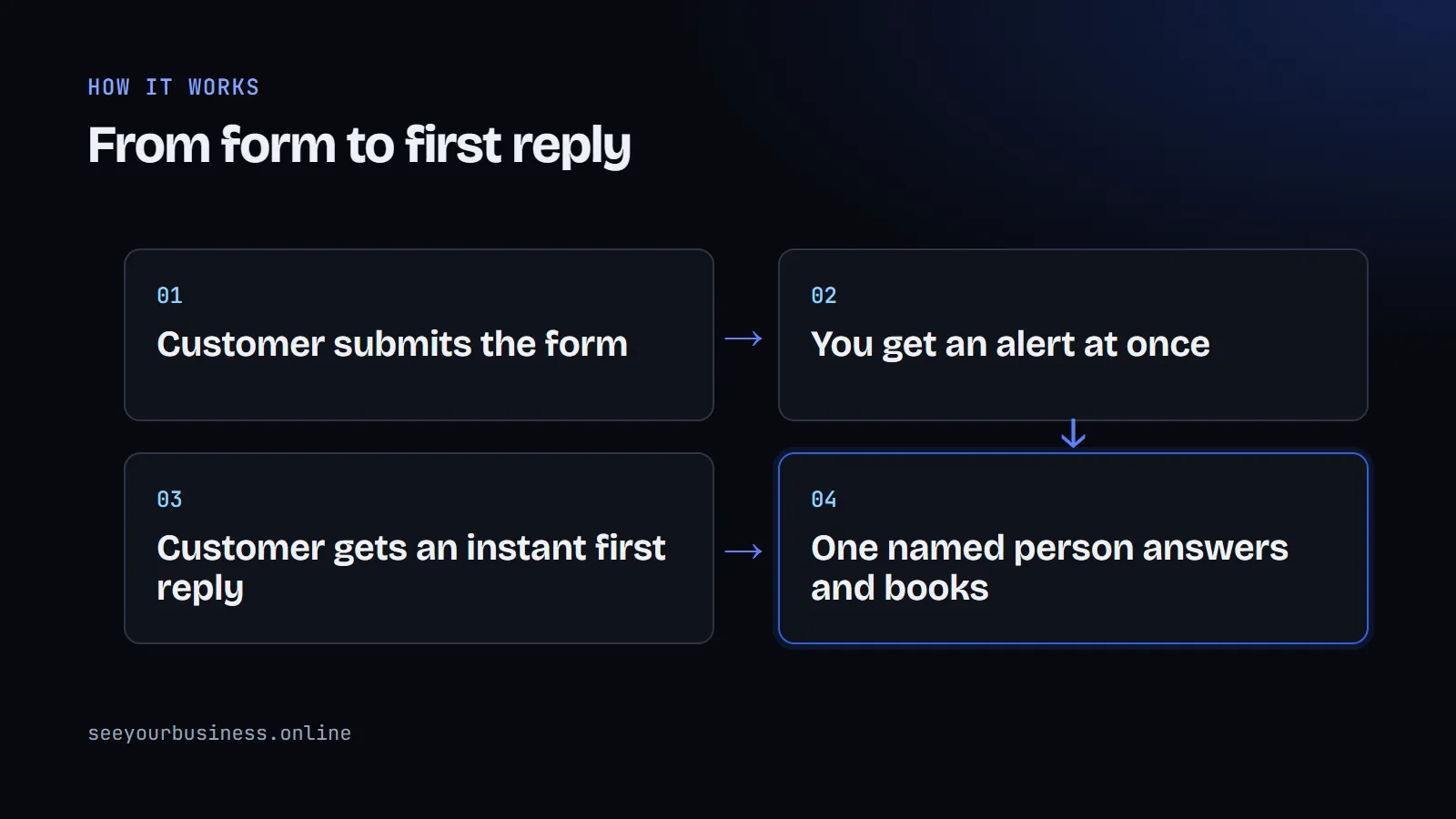
- Get alerted the moment a form is sent. If your form is a Google Form, open it, click Responses, click the More icon, and choose "Get email notifications for new responses," per Google's instructions. Turn on phone notifications for that email account too. If your site builder has its own form, look for the same kind of setting, usually called "form notifications."
- Send the customer an immediate first reply. The same Google page points to a Form notifications add-on that can send customized follow-up emails to the people who respond. Write a short note: thanks, here is when you will reply personally, and one question that moves things along, such as the address or the best time. For email inquiries sent straight to your inbox, Gmail has a built-in vacation responder with a subject and a message. It runs between a start and an end date, so set the dates for the days you are in the field. Most senders receive it once, on their first message.
- Name one person who owns the reply, and give them a rule. For example: whoever is not on a job answers, and if nobody has replied within a set number of minutes, the message goes to the owner's phone. Write the rule on a sticky note near the desk. It sounds small, but a named owner is what makes the other two steps matter.
Before you turn anything on, test it. Fill out your own form from your phone, with a personal email address, and watch what happens. Did the alert reach the right phone? Did the automatic note arrive, and does it read like a person wrote it? Does the booking option work on a small screen? Owners who skip this step often find out months later that the alert went to an old address.
Keep the first personal reply short. Answer the question they asked, offer two times for a call or visit, and make booking one tap, not a back-and-forth.
If you would rather not stitch the alert, the automatic note and the hand-off together yourself, this is the kind of lead automation we build: the form, your calendar and your inbox connected so the first reply goes out on its own.
What this setup does not fix
An automatic reply buys you minutes, not a sale. If the customer gets a note and then silence for two days, you have only made the wait feel politer. The point of step 2 is to keep the lead warm until a person writes back.
There are also limits we could not check from the sources. Google's pages describe how the tools work, not how fast you must answer to win, and the Harvard Business Review page gives its conclusion without the numbers. Any article that promises an exact number of minutes is guessing, or quoting an older study out of context. Our read is that "within minutes, by a person, with a clear next step" is a better target than a number.
The Gmail responder also skips messages that land in spam or come from mailing lists you subscribed to, according to Google's help page. Check your spam folder now and then, because a lead there never gets the reply.
There is one more habit worth adding. Once a week, look at the last handful of leads and note how long each waited for a human answer. You do not need a dashboard for this, only the timestamps on the form and on your reply. If the slowest ones all came in at the same time of day, such as the late afternoon when everyone is on a job, you now know where to put the extra help.
How it looks when replies go out fast
Picture the same plumbing company next month. The 7 p.m. form triggers a phone alert, and the customer gets a note within a minute saying you will write back tonight or first thing tomorrow. By the time the homeowner has opened the second company's page, you have offered two times for a visit. This is an illustration of how the setup works, not a result from a real business.
Our bet is that speed will keep mattering more than polish. A plain, quick reply from a real person beats a perfect message that arrives the next afternoon. If you want someone to build the full version, with the calendar and the follow-ups included, that is what See Your Business does for small businesses.
Sources
- The Short Life of Online Sales Leads, Harvard Business Review, 2011-03-01
- Send an automatic reply when you're out of office, Gmail Help, 2026-10-13
- View & manage form responses, Google Docs Editors Help, 2026-10-13
Book a strategy call
Answer 3 quick questions so we come prepared. No essays.
You talk to the people who build it.
A 20-minute call. We look at your current site, tell you what we would change and what it should bring back.
Get the next post by email
One email per new post. No spam.