Square vs QuickBooks for invoicing: what each costs a small business
Square invoices for free and QuickBooks starts at $38 a month, but the card fees run the other way. Here is the math and how to pick.
Say you run a small HVAC company. You sent six invoices three weeks ago, and four are still unpaid because nobody had time to chase them. That leads to a simple question about Square vs QuickBooks: which tool sends the invoice, nudges the customer and takes the card for less money? Both can send reminders on their own. The difference is what you pay each month and on each payment.
Is Square or QuickBooks cheaper for small business invoices?
It depends on how many invoices you send and how many are paid by card. Start with the monthly price, because that is where the two tools differ most.
Square treats invoicing as part of its free plan. Square's invoice pricing page says you can send unlimited invoices, set up recurring invoices on a daily, weekly, monthly or yearly schedule, and turn on automatic reminders that go out before, on or after the due date. Intuit's comparison page lists Square Free at $0 a month plus processing fees, Square Plus at $29 and up, and Premium at $149.
QuickBooks works differently. Its pricing page shows a Free plan at $0 that sends 2 invoices per month, or unlimited invoices if you qualify for and enable QuickBooks Payments. Paid plans start with Simple Start at $38 a month, with a promotional $19 a month for the first 3 months. The higher tiers cost $85 (Essentials), $140 (Plus) and $340 (Advanced) a month.
So why would anyone pay $38 when Square is free? Because QuickBooks is bookkeeping software that also invoices. Per the same Intuit comparison, invoicing is included with QuickBooks Online, while Square connects to accounting software through an API (a way for two programs to talk to each other, usually set up by a developer).
One caution: Intuit wrote that comparison, and it dates its prices March 27, 2026. Treat the Square numbers there as a competitor's snapshot.
Square vs QuickBooks on a $1,000 invoice: where the card fee lands
The monthly price is only half of the cost. Every time a customer pays by card, the tool takes a cut.
Intuit's comparison lists QuickBooks at 2.99% for a card paid through an e-invoice and Square at 3.3% plus 30 cents. On a $1,000 invoice, that is $29.90 with QuickBooks and $33.30 with Square.
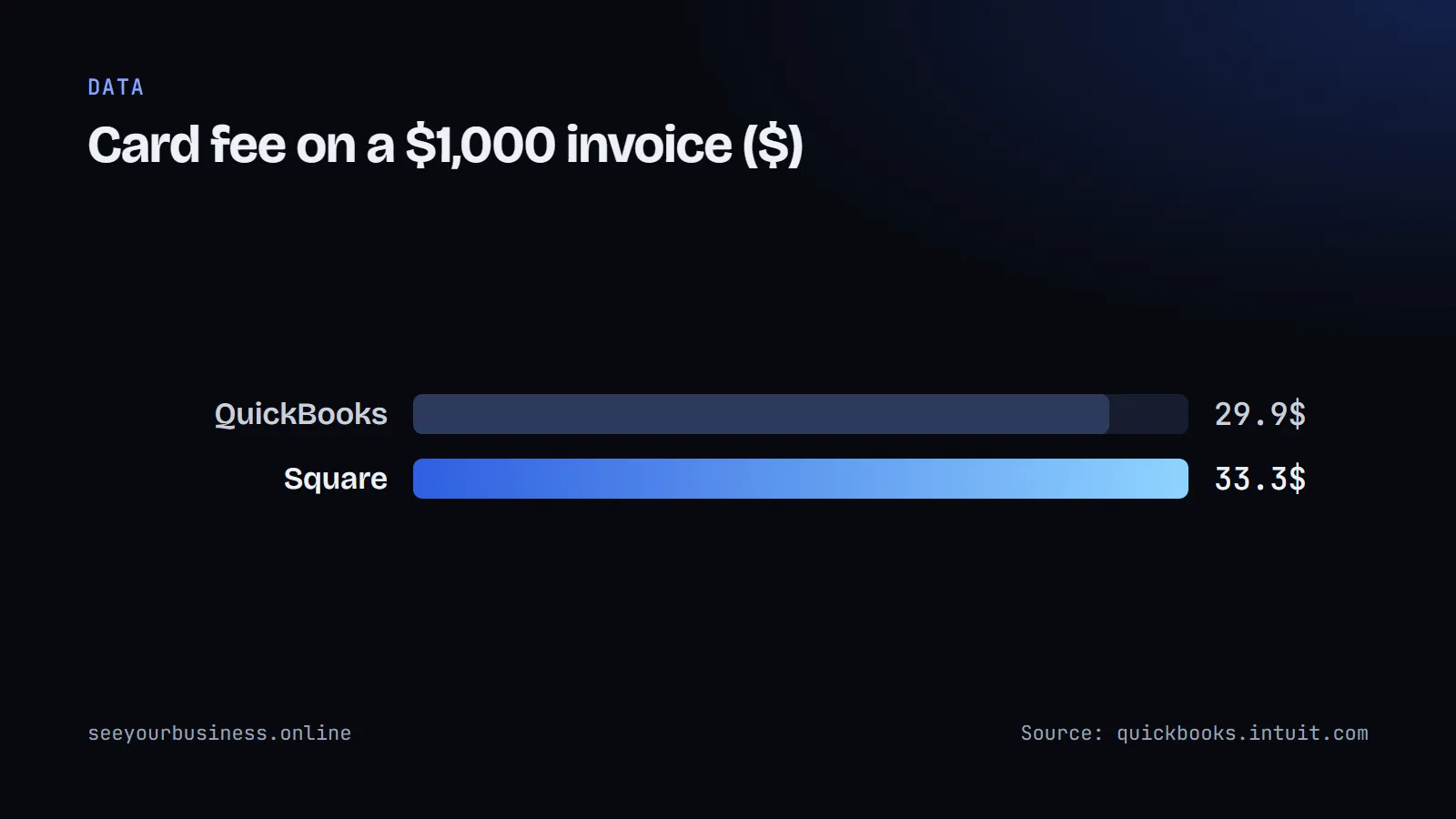
On those Intuit rates, the gap is $3.40 per $1,000 invoice. That is small on one job. Over a month it adds up, and the 30 cents hits small invoices hardest. A $100 invoice costs $3.29 on Square and $2.99 on QuickBooks, so the fixed 30 cents is a bigger slice of it.
Take an example, not a result from a real business. Suppose you collect eleven $1,000 invoices a month by card. At the same rates, the fee gap is about $37, which roughly pays for the $38 Simple Start plan. Below that volume, the free Square plan costs less overall. Above it, QuickBooks costs less and also gives you the books. Your own numbers will move that line, so run them yourself.
Bank transfers change the math again. Intuit lists QuickBooks e-check payments at 1% with a $1 minimum. Square's pricing page mentions a $10 cap for ACH bank transfers on the Plus plan, and we could not read the free-plan rate. On a large invoice, asking the customer to pay by bank transfer saves more than choosing either tool.
What else changes how fast you get paid
Both tools send automatic reminders, according to Intuit's comparison. The details differ, and the details decide how much chasing is left for you.
On recurring invoices, Square includes them on its free plan, per its own page. Intuit says QuickBooks offers recurring invoices on paid plans, and that autopay on recurring invoices is automated in QuickBooks but manual in Square. If you bill the same customers every month, that autopay line matters more than the card fee.
On partial payments, Intuit says QuickBooks accepts them and Square does not. It also says QuickBooks offers chargeback protection (help when a customer disputes a card payment) and Square does not. These are Intuit's claims about a rival, so confirm them with Square before you rely on them.
Intuit's invoicing page says you get paid 4 days faster on average when you send invoice reminders with its Payments AI. The page gives no sample size or method, so read that as marketing. The part that holds up in practice is simpler: a reminder that goes out on its own gets sent every time, and one you have to remember does not.
A plan you can follow this week
You do not need to switch tools to fix late invoices. Try this first.
First, count what you send. Write down how many invoices you send a month, the average amount and how many customers pay by card.
Second, pick by your situation. If you only need to invoice and take payments, and your books live somewhere else, start with Square's free plan. If you also need bookkeeping, or most of your income is large card payments, price out QuickBooks Simple Start.
Third, turn on reminders for the day before the due date, the due date itself and one week after. Set them once and leave them.
Fourth, put a bank transfer option on every invoice over a few hundred dollars. Fees on big card payments are the cost you can cut fastest.
Fifth, track how many days each invoice takes to get paid for the next 60 days. If the number does not drop, the tool was not the problem.
If your invoices, customer list and calendar still do not talk to each other, the gap is usually the connection between them. That is the kind of business automation we build.
What we could not confirm
We could not read the fee table on Square's own pricing page, so the Square card rates and plan prices above come from Intuit's comparison, dated March 27, 2026. Intuit sells the other side of this comparison, so check Square's page before you pick.
The QuickBooks pages also do not agree on one point. The pricing page limits the free plan to 2 invoices a month unless you enable QuickBooks Payments, while the comparison page only says invoicing is included. Prices and promotions change, and the 50% discount on QuickBooks plans runs for 3 months.
How it looks when the invoices chase themselves
Picture the same HVAC company a month from now. The invoice goes out the day the job ends. A reminder lands the day before the due date, another on the day, a third a week later. On Friday you open one list and see which ones are still open.
That is an illustration, not a result from a real business. Our read is that a shop that only invoices should start on Square's free plan, and that QuickBooks earns its fee once you need the books or send many card-paid invoices. We'd bet most owners overpay for features they never turn on. If you would rather have invoicing, reminders and bookkeeping wired together than set up by hand, that is what See Your Business does.
Sources
- Invoices Pricing & Plans, Square, 2026-10-29
- Square vs QuickBooks: 2026 Comparison, Intuit QuickBooks, 2026-03-27
- QuickBooks Online pricing, Intuit QuickBooks, 2026-10-29
- Online invoicing software, Intuit QuickBooks, 2026-10-29
Book a strategy call
Answer 3 quick questions so we come prepared. No essays.
You talk to the people who build it.
A 20-minute call. We look at your current site, tell you what we would change and what it should bring back.
Get the next post by email
One email per new post. No spam.