How to run a website speed test and fix what's slow, step by step
A slow site loses visitors without telling you. Here are five free steps to test your website speed, read the results, and fix the biggest problem first.

Say you run a landscaping company with four crews. Last week a homeowner searched for "lawn care near me" on her phone, tapped your site, and watched a blank screen for a few seconds. She went back and tapped the next result. If you want to know whether that is happening to you, a website speed test takes about five minutes, and you can run one today without a developer.
What is a website speed test, and what should it show?
A website speed test loads your page the way a visitor's phone would and reports how long the main content takes to appear. Google's free tool for this is PageSpeed Insights, which reports on mobile and desktop and suggests improvements.
Google judges speed with three measures called Core Web Vitals. According to web.dev, a page counts as good when the main content shows up within 2.5 seconds (Largest Contentful Paint, or LCP), the page reacts to a tap within 200 milliseconds (Interaction to Next Paint, or INP), and nothing jumps around while loading, scored at 0.1 or less (Cumulative Layout Shift, or CLS). Google checks the 75th percentile of visits, which means three out of four visits need to meet all three targets.
You are not alone if you fall short. The 2025 Web Almanac, a yearly study of the web by HTTP Archive, found that only 48% of websites on mobile had good Core Web Vitals in July 2025, up from 44% a year earlier. On desktop the share was 56%.
Why a slow page costs you calls
Nobody tells you when a visitor leaves. There is no missed call in your log and no angry email. The visitor taps back, and your competitor gets the job. That is why a slow site feels fine from your desk: you load it on office Wi-Fi with the page already saved in your browser.
Phones make it worse. The same Almanac chapter shows that 62% of mobile sites have a good LCP, against 74% on desktop, and 13% of mobile sites land in the poor range, against 7% on desktop. The slow part is usually the biggest thing on the screen. Per the Web Almanac, an image is the largest element on 76.0% of mobile pages, and about 16% to 17% of pages even tell the browser to wait on that very image.
Think of a restaurant that is open but takes ten minutes to bring the first glass of water. The kitchen may be great. Guests judge the place by the wait at the start.
How do I test my website speed and fix what's slow?
Here is a plan you can follow on your own, with tools that cost nothing.
The score at the top of the report is a separate thing. Lighthouse, the lab tool inside PageSpeed Insights, gives a performance score where 90 or above is good, 50 to 89 needs improvement, and below 50 is poor. A high score feels good, but it comes from one simulated phone on one network. Your real visitors use older phones, weak signal in a truck cab, and busy coffee-shop Wi-Fi, which is why the field numbers get the final word. If the two disagree, trust the field data and use the lab score to find what to fix.
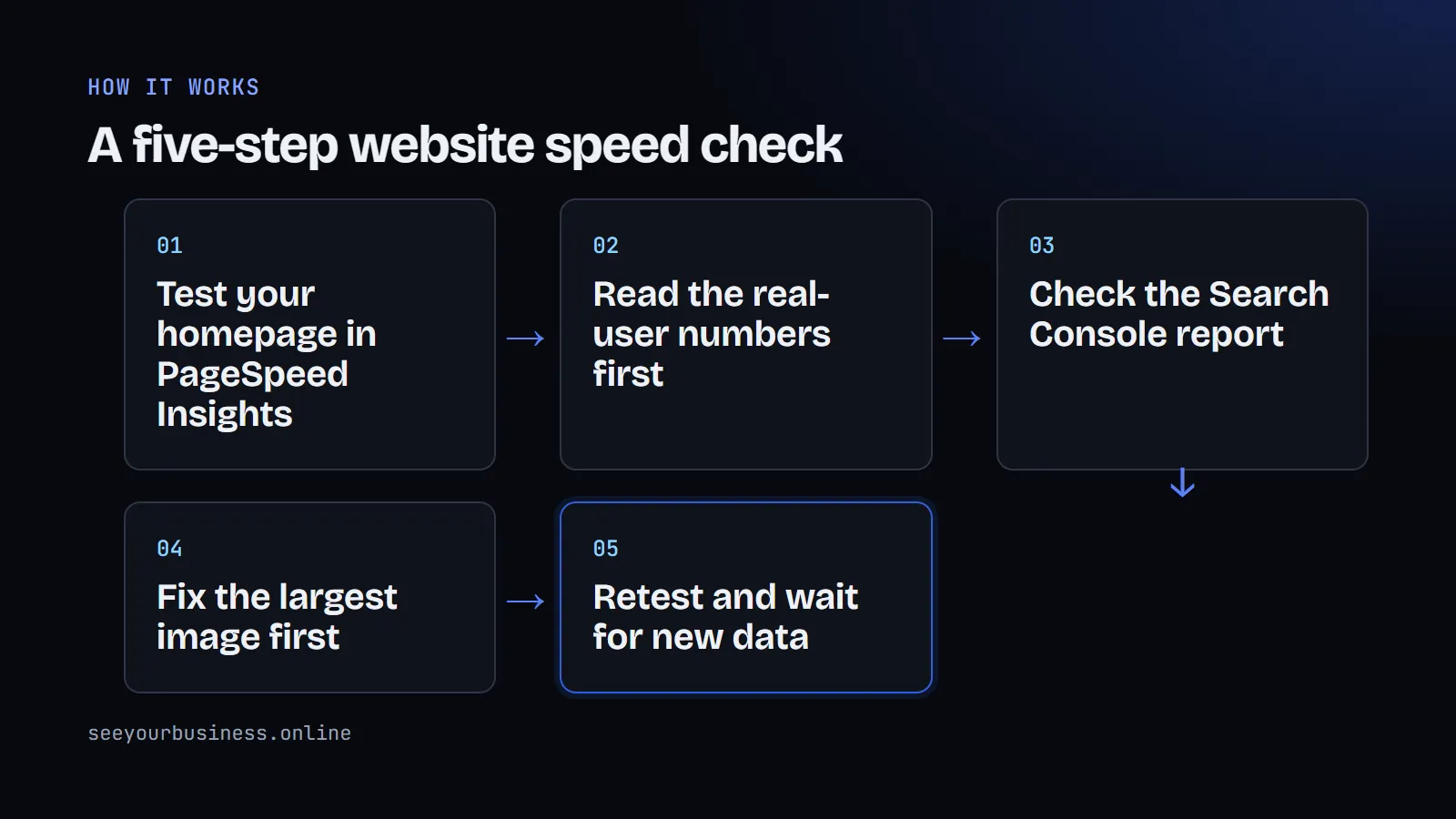
- Test two pages. Open PageSpeed Insights, enter your homepage address, and look at the mobile results. Then test the page where customers call or book, such as a service page.
- Read the field data before the score. The report shows two kinds of data. Field data comes from real visitors and covers the last 28 days, while lab data comes from a simulated load on one device. Google's documentation says lab data is useful for debugging, but it can miss real-world slowdowns. So start with the field numbers and compare them to 2.5 seconds, 200 milliseconds, and 0.1. If your site is too small to have field data, use the lab results as a guide only.
- Check Search Console. If you have a free Google Search Console account, open the Core Web Vitals report. It groups similar pages and shows the status by device. According to Google's Search Console help, a group takes the status of its worst metric, and the data covers the last 28 days. A brand-new site may show "No data available" for a while.
- Fix the largest image first. Since images are the biggest element on most pages, start with the photo at the top of your homepage. web.dev's LCP guide says to compress and resize images, use modern formats, and never lazy-load the main image, because that adds a delay before the image even starts to download. The same guide suggests marking the likely main image as high priority, but not too many images. Ask whoever manages your site to do these things, or use your website builder's image settings.
- Retest, then wait. Lab results change right away, but field data is a 28-day window, so it moves slowly. Retest the lab score the same day and check field data again in a month.
If your site still fails after these fixes, the cause is often deeper: a heavy theme, too many plugins, or slow hosting. The LCP guide splits the wait into four parts and says the time to the first byte of the page should be about 40% of the total, so a slow server shows up there. That is the point where a rebuild can be cheaper than patching. It is the kind of work behind the fast marketing websites we build, but the five steps above need no one.
What a speed test can't tell you
A speed score does not predict how many calls you get. We found no study in our sources that ties these three numbers to leads for a business your size, so treat 2.5 seconds as Google's target, not a promise of more customers.
Field data is also a sample. Google's Search Console help says the report shows a sample of indexed pages, not every page. And a green score on the homepage can hide a slow booking page, which is why step one tests two pages.
Our read: fix speed when your numbers are clearly in the poor range, then move on. A page at 2.4 seconds does not need more work, while a page at 5 seconds does.
What your site looks like when this works
Picture the same homeowner a month later. She taps your result, the photo and the phone number appear before she has time to look away, and she calls. You did not add a feature. You removed a wait.
You also know where you stand: two pages tested, a Search Console report you can read, and a retest date on your calendar. If you would rather hand the fixes to a team, that is what See Your Business does.
Sources
- Web Vitals, web.dev (Google), 2024-10-31
- About PageSpeed Insights, Google, 2024-10-21
- Optimize Largest Contentful Paint, web.dev (Google), 2025-03-31
- Core Web Vitals report, Google Search Console Help, 2026-10-27
- Performance, Web Almanac 2025, HTTP Archive, 2026-05-05
Book a strategy call
Answer 3 quick questions so we come prepared. No essays.
You talk to the people who build it.
A 20-minute call. We look at your current site, tell you what we would change and what it should bring back.
Get the next post by email
One email per new post. No spam.