HubSpot vs Salesforce for a small business: what each CRM costs
HubSpot's free tools cover 2 users at $0, while Salesforce Starter Suite starts at $25 per user a month. What each CRM costs and which one fits a small team.
Say you run a four-person remodeling company. Leads arrive by phone, by text and through your website form, and half of them live in somebody's inbox. When you ask who called back the last customer, nobody knows. In the HubSpot vs Salesforce choice for a small business, HubSpot is the cheaper way to start: its free tools cost $0 for up to 2 users, while Salesforce Starter Suite starts at $25 per user a month.
Do you need a CRM, or is the spreadsheet enough?
A CRM (customer relationship manager) is one place that holds every lead and customer, with a record of who talked to them and what happens next. The question is not whether you need software. It is whether the way you track leads today is already costing you work.
Salesforce describes the problem as customer data scattered across sticky notes, personal inboxes and spreadsheets. If that sounds like your office, the cost is easy to picture: a lead waits a day for a reply, a quote never gets a follow-up, and the customer calls the next company on Google.
Our read is that two people sharing a short list of jobs can often stay on a spreadsheet. A CRM starts to pay off when leads come from more than one place, when more than one person talks to customers, or when you cannot say what happened to last month's inquiries.
Is HubSpot or Salesforce cheaper for a small business CRM?
Both companies publish prices, and both change them, so we read the pages on November 5, 2026. Treat every number below as a snapshot, and check the page again before you sign up for anything.
HubSpot has a permanent free tier. HubSpot's pricing page says the free tools cost $0 a month for up to 2 users, with no credit card and no time limit. They hold up to 1,000 contacts and connect to Gmail and many versions of Outlook. Starter is the paid step: normally $20 a month per seat, with a limited-time offer for new customers at $10 a month per seat month to month or $7 a month per seat on an annual plan.
Salesforce lists its paid suites on its pricing page. The Starter Suite is $25 per user a month, billed monthly or annually, and labeled a starting price with transaction fees on top. The Pro Suite is $100 per user a month, billed annually with a contract. Starter includes lead scoring, built-in sales flows, lead routing and a free Slack workspace connected to the CRM.
Here is what that means for a team of five, using the prices on both pages. HubSpot Starter at $20 a seat is $100 a month, or $50 a month on the $10 offer. Salesforce Starter at $25 a seat is $125 a month. HubSpot's free tools do not cover five people, because the free plan stops at 2 users.
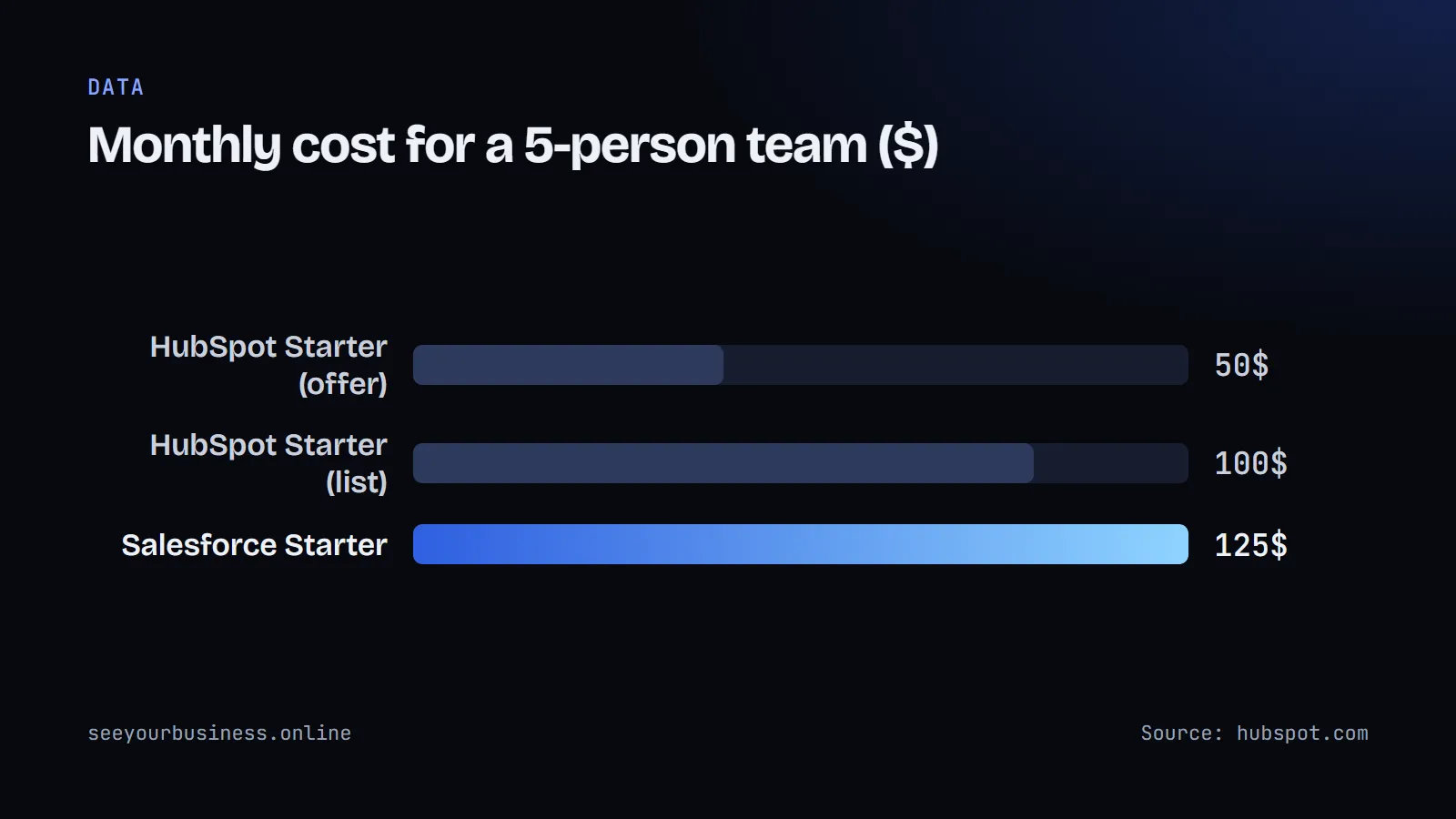
The gap between HubSpot Starter at $20 and Salesforce Starter at $25 is $25 a month for five seats at list price. That is small next to the cost of one lost job, so price should not be the only thing you compare. What matters more is whether your whole team will actually open the tool each morning, and whether your website form can send new leads into it without anyone copying them by hand.
HubSpot vs Salesforce: which CRM fits which shop
Start from your team size and what you need the tool to do. These steps work whichever name you pick.
First, count the people who will touch leads. One or two people can start on HubSpot's free tools at no cost. Three or more means paying for seats on either side.
Second, list where leads come from: the website form, phone, email, text, a directory. A CRM only helps if every source ends up in it. Check that your website form can send leads into the tool you choose.
Third, decide on one follow-up rule before you set anything up. For example, every new lead gets a reply the same day and a second touch in three days. Write it down and build the tool around it.
Fourth, run a two-week trial with real leads. Salesforce advertises a free trial of Starter, and HubSpot's free plan needs no card, so you can test both without paying.
Our view: a very small team that wants to spend nothing should try HubSpot first. A team that already uses Slack all day, or expects to grow into custom workflows, can reasonably start on Salesforce Starter. If your forms, calendar and inbox still do not feed the CRM on their own, that connection work is the kind of business automation we build.
What the pricing pages do not tell you
Free and cheap plans have limits. HubSpot says the free account holds 1,000 contacts and 1,000 records of other standard types, and Starter adds email and chat support, automation and meeting scheduling, and removes HubSpot branding. If you pass those limits, you pay.
We could not confirm the limits of Salesforce's free offer. Its pages advertise a free start but do not state a user cap or contact cap in the text we could read, and the $25 Starter price is described only as a starting price with transaction fees. Ask before you commit.
The HubSpot discount is for new customers and is available for a limited time, so the $7 and $10 prices may not be there next month. Plan around the $20 list price. Neither page tells us how long setup takes for a shop with no IT person, and a tool nobody updates is worth nothing at any price.
How it looks when every lead is in one place
Picture the same remodeling company a month from now. Every call, text and form lands in one list. Each lead has an owner and a next date. On Monday you open the list and see which quotes have gone quiet.
That is an illustration, not a result from a real business. We'd bet that for most small teams the winning CRM is the one all of them actually open every day, not the one with the longest feature list. If you would rather have the forms, follow-ups and calendar wired into whichever tool you choose, that is what See Your Business does.
Sources
- Free Tools, HubSpot, 2026-11-05
- Small Business CRM Pricing, Salesforce, 2026-11-05
- All-in-one CRM Suites Built for Small Business Growth, Salesforce, 2026-11-05
Book a strategy call
Answer 3 quick questions so we come prepared. No essays.
You talk to the people who build it.
A 20-minute call. We look at your current site, tell you what we would change and what it should bring back.
Get the next post by email
One email per new post. No spam.