What to do if your website gets hacked, step by step
A hacked site can send your customers to spam and show a warning with your name on it. Here are five free steps to confirm the hack, fix it and get back in Google.
Say you run a family dental office. A patient calls to say that when she clicked your site in Google, she landed on a page selling pills. You type the address yourself and everything looks normal. That is one common way a website gets hacked, because Google says some hacked sites send visitors to spam only when they arrive from search results. Here is how to confirm it and fix it in five steps.
How do you know your website got hacked?
You usually hear it from someone else. A customer, a search warning, or a strange page in your results tells you before your own screen does.
Google's spam policies describe hacked content as anything placed on your site without your permission because of a security weakness. It takes four common forms. Code injection means attackers slip malicious JavaScript into your existing pages. With page injection, they add whole new pages full of spam or phishing, so your real pages may look fine. Content injection hides links or text that search engines can read but visitors rarely see. And with redirects, some visitors get sent to a harmful page, sometimes only when they click through from Google.
The cost lands on your customers first. Google's Search Console help says pages with a security issue can show a warning label in search results, or a full warning page in the browser when someone tries to open them. A patient who sees a red warning with your practice's name on it does not call. She books with the next office on the list.
Why do small business websites get hacked?
Mostly because someone found the front door unlocked, not because anyone picked your business out. The 2025 Data Breach Investigations Report from Verizon, which has a snapshot for small and medium-sized businesses, says the most common hacking method against them was the use of stolen credentials, at 33% of the cases it counts. The report covers all kinds of breaches, not only websites, but the lesson carries over. A reused or weak password is the key under the doormat.
The second door is old software. CISA, the U.S. government's cybersecurity agency, says in its four cybersecurity essentials (August 2025) that outdated software is one of the easiest ways in, because criminals go after known weaknesses. A website theme or plugin you installed three years ago and never updated fits that description.
Size does not protect you either. The same Verizon snapshot says ransomware groups do not seem to care how big a company is, and that small businesses are less likely to have up-to-date, readily available backups. Ransomware showed up in 88% of the small and medium-sized business breaches in the report. A backup you can actually restore is what separates one lost afternoon from a lost month.
What should I do if my website gets hacked?
Work through these in order. Each step uses free tools or things your host already offers.
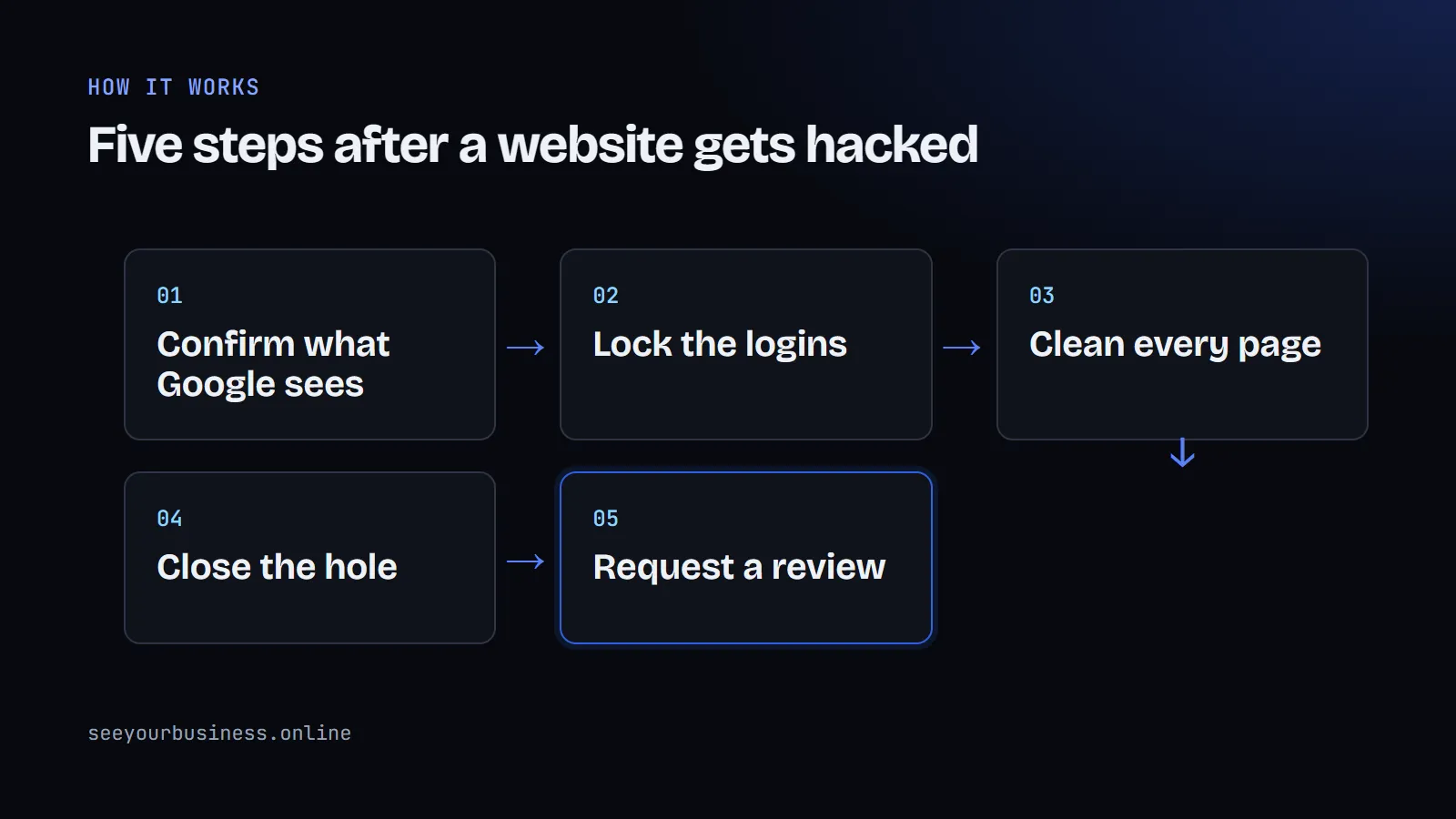
- Confirm what Google sees. Sign in to Google Search Console, which is free once you verify that you own the site, and open the Security issues report. According to Google's help page, it lists what Google found and shows sample affected addresses, though the list is only a sample and may not show every page. Google also says you may not be able to reproduce a warning yourself, so treat this report as the source of truth. As a second check, search for your business name on your phone and click your own listing, since a redirect can hide from a direct visit.
- Lock the logins. Change the password for your website admin, your hosting account and your email, starting with the ones tied to the site. CISA's guidance is a strong, unique password of at least 16 characters for every account, kept in a password manager, plus multifactor authentication (a second check, like a code on your phone) on every admin account. It lists a physical security key first, which it says protects best against phishing, then an authenticator app. Do this before you clean anything, because an attacker who still has your password can undo your work.
- Clean every page, including the ones you never made. Our advice is to ask your host or developer for a backup from before the problem started, and to restore it. Google's help page is blunt about scope: you must fix the issue throughout your site, because fixing only some pages earns no partial return to search results. Remember that page injection adds new pages, so check for addresses you do not recognize, not just the ones you wrote.
- Close the hole. A clean site that still has the same weakness gets hacked again. Per CISA, turn on automatic updates where you can, patch the parts of your site that the public can reach first, and replace software that is out of date. Then set up a regular backup, since Verizon found small businesses often lack one.
- Request a review. When every issue is fixed, open the Security issues report and select Request Review. Google's help page says your request should do three things: explain the exact issue, describe the steps you took, and document the result. Reviews can take several days or weeks, you get email updates, and you should not resubmit before you hear back.
The plan works without us. If it looks like more than a weekend, we design and build marketing websites for small businesses, and a site with few moving parts gives an attacker less to find.
What this guide cannot tell you
Our sources do not say how much a cleanup costs, so we will not guess a number. They also cannot tell you how the attacker got in. Your host's logs might, and a developer can read them. Without that answer, step four is an educated guess.
If customer information may have been taken, such as names, payment details or health records, talk to a lawyer or your insurer about what you owe your customers. The rules differ by state and by industry, and the sources used here do not cover them.
Our read: most small sites do not need a security team. They need unique passwords, a second login check, updates that run themselves, and one backup someone has actually restored. That short list closes the doors that Verizon's numbers point to.
What your site looks like when it is fixed
Picture the same dental office a few weeks later. The warning is gone from search results. When the patient clicks your listing, she lands on the booking page, and the phone rings for the right reasons.
You also know where you stand. Your logins are locked down, your updates run themselves, and you have a backup you tested. If you would rather have a team build the site and set it up that way from the start, that is the work See Your Business does.
Sources
- Spam policies for Google web search, Google Search Central, 2026-08-28
- Security issues report, Google Search Console Help, 2026-11-03
- Four Cybersecurity Essentials for Businesses, CISA, 2025-08-29
- 2025 Data Breach Investigations Report: Small- and Medium-Sized Business Snapshot, Verizon, 2025-05-28
Book a strategy call
Answer 3 quick questions so we come prepared. No essays.
You talk to the people who build it.
A 20-minute call. We look at your current site, tell you what we would change and what it should bring back.
Get the next post by email
One email per new post. No spam.